Email and communication
The Contact-Specific Inbox: Every Email You've Ever Exchanged With a Buyer or Seller, on One Record
Your best deal intelligence is buried in years of email. The contact-specific inbox brings every message you and your team have ever exchanged with a contact, past and present, onto that contact's record in Vertica CRM.
Quick answer
A contact-specific inbox is a CRM feature that collects every email exchanged between your team and one contact into that contact's record. In Vertica CRM it works with any email domain, and it doesn't stop at new messages: the CRM downloads all historical email to and from the contact that is still on your mail server, then keeps checking the server at regular intervals for new mail. Brokers keep using Outlook, Gmail or their phone as usual, the whole team sees the full conversation history on the record, and the permission system controls who can see which contacts' email.
Picture a broker named Sarah. For four years she has been nurturing the owner of a regional HVAC company: coffee every few months, a valuation in 2023, a long email thread about whether his daughter might take over the business one day.
In March, Sarah leaves the firm. Her inbox goes with her.
In June, the owner is finally ready to sell. He emails Sarah's old address and gets a bounce. He calls the office, and the broker who picks up has never heard of him.
“Can you send me some background on the business?” she asks.
The owner sent all of it, years ago. He thanks her, hangs up, and calls the broker his accountant mentioned last week.
Four years of relationship, gone in one phone call. Not because anyone did anything wrong, but because the history lived in one person's inbox. Every brokerage has years of deal intelligence locked in email like this: what sellers really care about, what buyers asked before they went quiet, what was promised and when. The contact-specific inbox is how Vertica CRM puts all of it, past and present, where your whole team can use it.

What is a contact-specific inbox?
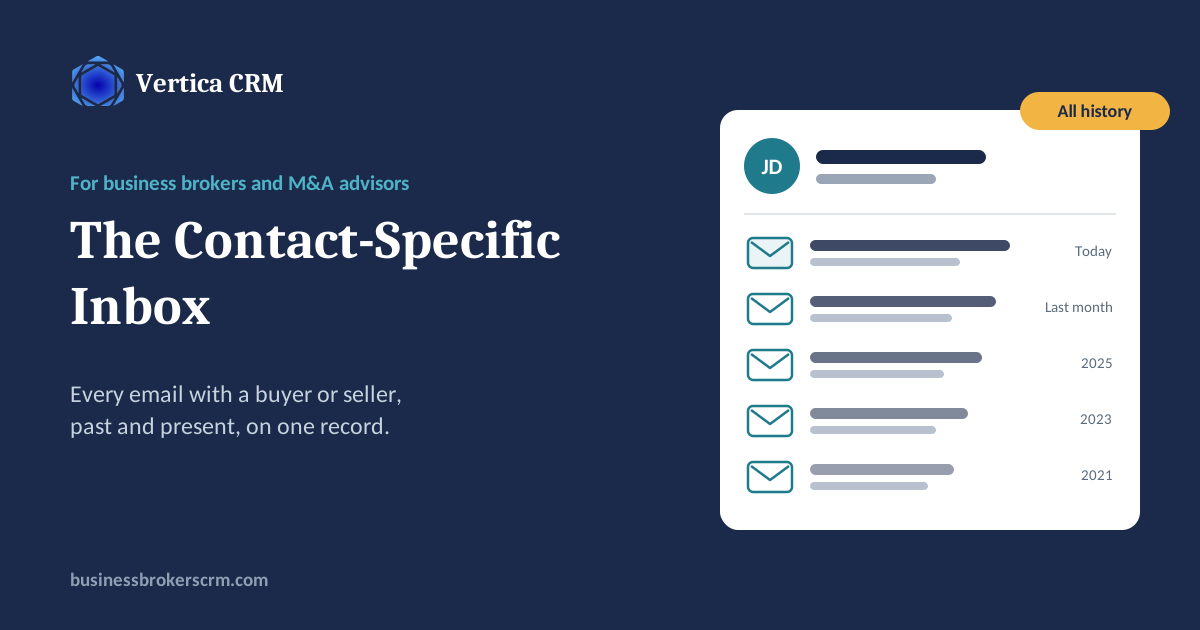
A contact-specific inbox is an inbox built into each contact's record in your CRM. It shows every email exchanged between that contact and anyone at your firm, in one conversation history, regardless of which broker sent it or which device they used.
Open a seller's record and you see every message your team has exchanged with that seller. Open a buyer's record and you see every question they've asked, every file you've sent and every reply, from the first inquiry onward. You can read, reply, forward and delete right there, as if it were an inbox dedicated to that one person.
It's different from a shared mailbox, which mixes every client together, and from “log this email” buttons, which only work when someone remembers to click them.
Your entire email history, indexed
Most CRMs only start recording email from the day you switch them on. Everything before that stays in personal inboxes, which means your new system starts with no memory.
Vertica CRM works the other way around. When a mailbox is connected, the CRM downloads all email to and from each contact that is still on your mail server, however far back it goes, and files it on that contact's record. Years of correspondence with a seller you've been nurturing, every exchange with a repeat buyer, the back-and-forth with an attorney on a deal that closed three years ago: it all becomes part of the record.
That changes what a CRM is worth on day one. Instead of an empty database you slowly fill, you start with the relationship history your firm has already built.
- Any email domain. Microsoft 365, Outlook, Gmail, Google Workspace or your own mail server.
- All history on the server. If the email is still on your mail server, it can be imported. Email already deleted from the server can't be.
- Hands-off. A scheduled job checks the server at regular intervals, so history comes in and new mail keeps flowing without anyone exporting, importing or logging anything.
Back to Sarah's seller
In Vertica CRM, the owner's four years of email with Sarah would have been on his contact record. The broker who answered his call would have opened it, seen the 2023 valuation and the conversation about his daughter, and said: “Of course. Sarah told us all about you. Let's talk about next steps.”
How it works, step by step
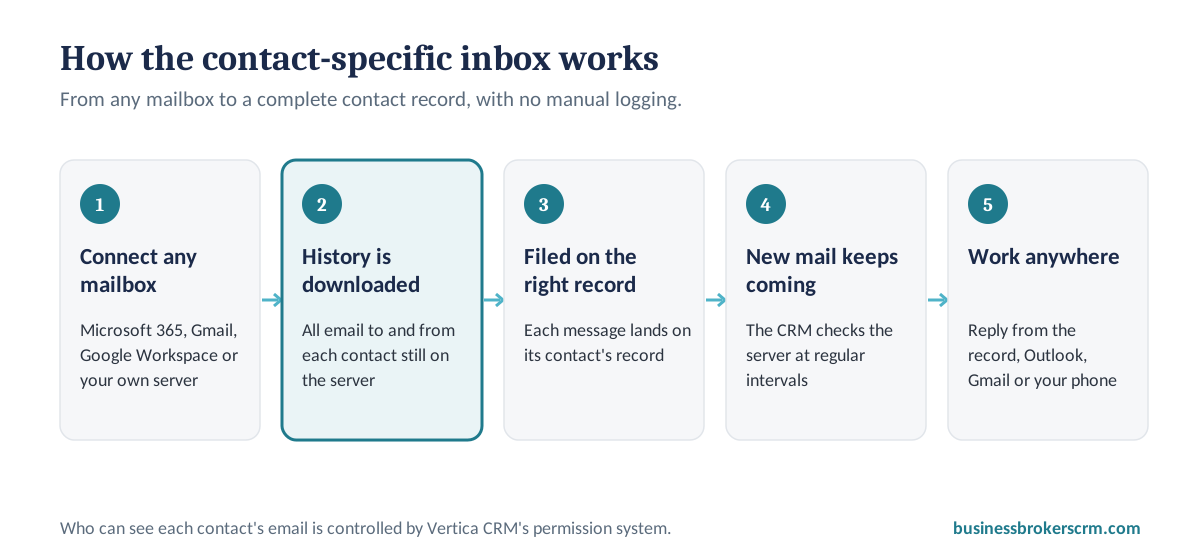
- Connect your mailbox. Link each user's email account to Vertica CRM. It works with any email domain, whether you're on Microsoft 365, Google Workspace or your own mail server.
- History is pulled in. The CRM downloads every email to and from each contact that is still on your mail server, however old it is.
- Each email lands on the right record. Messages are filed on the contact record of the person they were sent to or received from.
- New mail keeps flowing in. A scheduled job checks the mail server at regular intervals, so new messages appear on the record without anyone logging them.
- Work from the record or your inbox. Read, reply, forward or delete from the contact record, or keep using Outlook, Gmail or your phone. Either way, the record stays complete.
How it compares with other ways to track client email
Most brokerages use one of these approaches today. Here is what each one means for your team:
| Approach | Who can see the emails | Email history | Effort to keep complete |
|---|---|---|---|
| Each broker's own inbox | Only the broker who sent it | Lost when the broker leaves | None |
| CC or BCC to a logging address | Whoever remembers to CC | Only from the day you start | Forgotten often |
| Shared mailbox | Everyone, for every client | Mixed across all clients | None for permissions |
| Vertica contact-specific inbox | Everyone with permission, on the contact record | All history still on the server, plus new mail | Automatic |
A day in the life of a multi-broker firm
The contact-specific inbox isn't only insurance against a broker leaving. In firms where several people work the same deal, it changes how the day runs.
The buy-side broker and the sell-side broker on one deal
Mike represents the seller of a commercial bakery. Priya, his colleague, is working with the buyer. On Tuesday morning the buyer emails Priya: did the seller say the landlord would extend the lease?
Priya doesn't need to interrupt Mike, who is at a closing across town. She opens the seller's contact record and finds the thread from three weeks ago, where the seller told Mike the landlord had agreed in principle to a five-year extension. She replies to the buyer in ten minutes, accurately, with the date of the seller's email. When Mike gets back, he opens the buyer's record and sees exactly what Priya told him. Nobody repeats themselves, nobody contradicts each other, and the deal keeps moving.
The broker and the admin serving a client together
Lauren runs the back office for two brokers. A seller emails his broker, Tom, from the road: he has the updated financials and wants to know where to send them. Tom replies from his phone between meetings: “Send them over, Lauren will update the listing.”
Both emails show up on the seller's record for Lauren, without Tom forwarding anything. When the financials arrive, she updates the listing, refreshes the data room and confirms with the seller herself. The seller gets a faster, more professional response, and Tom never has to send a “did you see this?” message.
That is what one shared conversation history does for a team: everyone works from the same facts, and the client feels like they're dealing with one firm, not three separate inboxes. And because the permission system controls who can see which contacts, you decide exactly how much each person shares.
Five ways it helps your brokerage
1. Anyone on the team can pick up a conversation
When a seller calls and their broker is out, whoever answers opens the record and sees the whole history. No “let me check with my colleague and call you back.”
2. Relationships don't leave when a broker does
Brokers move on. Their email history with your sellers and buyers shouldn't go with them. On the contact record, it stays with the firm.
3. Faster, better answers to buyers
Buyers ask about things they were told months ago. With every message on the record, you answer accurately the first time, which is how you look like the professional firm you are. (For more on keeping buyers engaged, see the data room advantage.)
4. A record you can rely on
When an attorney asks what a buyer was sent and when, or a seller wants to know who has been in touch, the answer is on the record with dates attached.
5. Context for every follow-up
Before you call a seller you've been nurturing for two years, read the last few exchanges in seconds. Every follow-up picks up where the last one ended. (Why follow-ups lead to fortunes.)
Who sees what: privacy and permissions
Bringing email into a shared system raises a fair question: will everyone see everything? Only if you want them to.
Vertica CRM's permission system lets you decide which users can see which contacts and their email. A principal can see across the firm, a broker can be limited to their own contacts, and sensitive relationships can be restricted to the people working on them. The contact-specific inbox follows the same rules as the rest of the CRM, so setting up permissions once covers email too.
Works with the email you already use
Brokers don't have to change how they work. They keep sending from Outlook on their laptop, Gmail in the browser or the mail app on their phone in the car between meetings. Vertica CRM picks up those messages from the server and files them on the right record. Brokers who prefer to work inside the CRM can send, reply and forward from the contact record itself.
That matters more than any feature list. CRMs fail when they ask busy people to change habits. (Your brokers aren't resistant to technology.) The contact-specific inbox asks for nothing: it simply makes the record complete.
See your own email history on a contact record
I'll show you the contact-specific inbox working on a pipeline like yours, and how your team's past email comes with you when you switch.
Schedule a Demo Questions? Call our office at +1 212 901 5195.Frequently asked questions about contact-specific inboxes
What is a contact-specific inbox in a CRM?
A contact-specific inbox is a CRM feature that gathers every email exchanged between your team and one contact into that contact's record. Instead of searching several personal inboxes, anyone with access opens the contact and sees the full conversation history in one place.
Can Vertica CRM import my historical email?
Yes. Vertica CRM downloads all email to and from each contact that is still on your mail server, no matter how old it is, and files it on that contact's record. Email you have already deleted from the server cannot be imported.
Does it work with Outlook and Gmail?
Yes. The contact-specific inbox works with any email domain, including Microsoft 365, Outlook, Gmail, Google Workspace and self-hosted mail servers. Brokers can keep using their usual email app on their computer or phone.
Do I have to send email from inside the CRM?
No. Email sent from Outlook, Gmail or a phone is captured on the contact record just like email sent from the CRM's built-in inbox. You can also reply, forward and delete directly from the contact record if you prefer.
How quickly do new emails appear on the contact record?
Vertica CRM checks your mail server at regular intervals with a scheduled job, so new messages appear on the record automatically within a short time, with no manual logging.
Can I keep some emails or contacts private?
Yes. Vertica CRM's permission system lets you control which users can see which contacts and their email, so sensitive correspondence is only visible to the people who should see it.
How does a contact-specific inbox help a team of brokers?
When several people work the same deal, such as a buy-side broker, a sell-side broker and an admin, the contact-specific inbox gives them one shared conversation history for each contact. Anyone with permission can see what the client was told and when, answer questions without interrupting a colleague, and follow up without forwarding emails back and forth.
Why does a business broker need a contact-specific inbox?
Business sales involve many people over months or years: sellers, buyers, attorneys, accountants and lenders. A contact-specific inbox keeps every message with each of them on one record, so any broker on the team can pick up a conversation, answer a question about past correspondence, or prove what was sent and when.
Joshua Factor
Founder of Vertica CRM and a former business broker. Vertica CRM has spent 12 years building software exclusively for business brokers and M&A advisors, shaped by feedback from hundreds of brokerage clients. Connect on LinkedIn.
Related reading
Best CRM for Business Brokers in 2026
Purpose-built vs. general CRMs, compared.
The Data Room Advantage
How one record runs every inquiry, NDA and file release.
Follow-Ups Lead to Fortunes
How automated follow-up turns more leads into deals.
How Vertica CRM Takes Care of Sellers
From first call to referral.
Your Brokers Aren't Resistant to Technology
Why brokers abandon CRMs that weren't built for them.
Lead Parsing for Business Brokers
How marketplace inquiries become contacts automatically.
Book a demo with the founder
See the contact-specific inbox on a pipeline like yours.