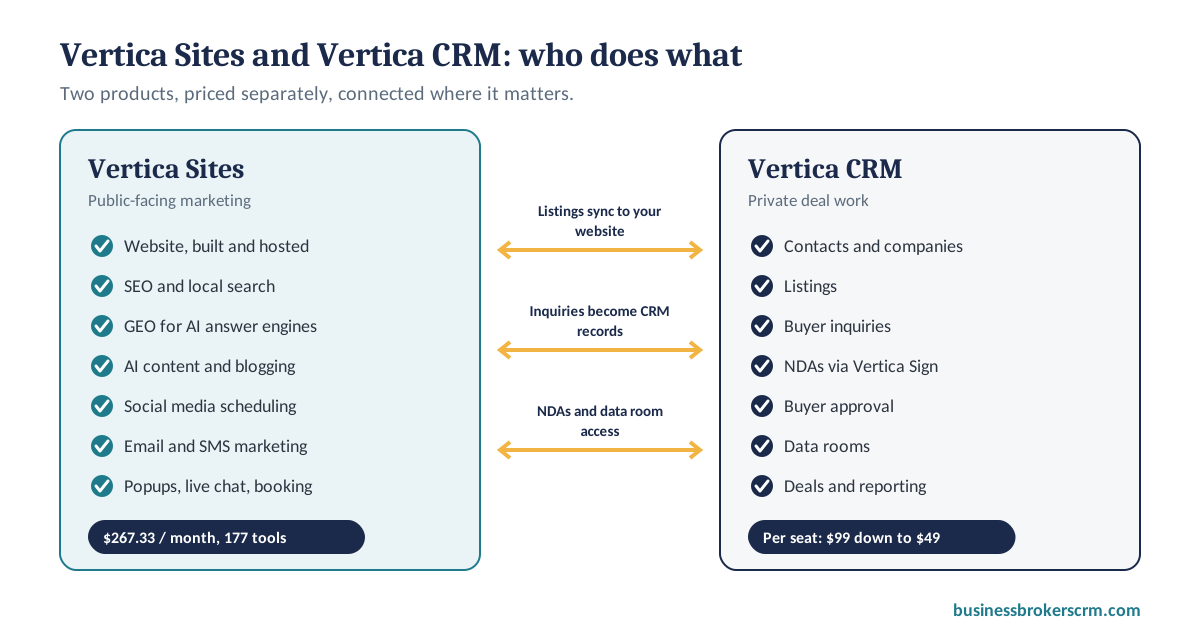
Your Web Browser is a Crime Scene. Let’s Clean It Up.

Posted on

Recent Posts

Websites and marketing

Your Browser Is a Crime Scene: A Better Website and Marketing Platform for Business Brokers

If you're shopping for a new business broker website, don't buy another brochure. Here's what a brokerage website needs to do in 2026, and how Vertica Sites replaces a browser full of disconnected tools with one platform connected to your CRM.
By Joshua Factor, Founder of Vertica CRM • Published • Updated • 14 min read
From a browser full of tabs to one platform: Vertica Sites, the website and marketing platform for business brokers

Quick answer

Vertica Sites is a website and marketing platform built for business brokers and M&A advisors. For $267.33 a month it includes a professionally built, hosted website and 177 tools: SEO and local search, AI content and blogging, social media scheduling, email and SMS marketing, popups and live chat, appointment booking and workflow automation. It connects to Vertica CRM, so your listings, buyer inquiries and NDAs flow between your website and your deals. Vertica CRM user seats are priced separately.

It's 8:40 on a Tuesday morning, and Dan, a business broker with three listings in active marketing, has fourteen tabs open.

His WordPress dashboard wants another plugin update before he can edit the homepage. Mailchimp is half-way through a listing blast. Calendly shows a buyer call he forgot to put in his CRM. A Dropbox folder holds an NDA he still has to match to the right buyer. Hootsuite is waiting for a LinkedIn post. And a spreadsheet tracks which buyers have seen which financials, because nothing else does.

Then his phone rings. A buyer saw the commercial bakery on Dan's website and wants to schedule a call.

The bakery went under contract three weeks ago. Nobody updated the website.

That's the real cost of a browser full of tabs. It isn't only the subscriptions. It's the website that drifts out of date, the buyer who slips between two apps, and the hours spent copying the same information from one tool into another. In business brokerage, slow follow-up and stale information cost deals.

This guide is for brokers who are thinking about a new website, or who are tired of paying for six tools that don't talk to each other. It explains what a business broker website needs to do in 2026, and how Vertica Sites and Vertica CRM work together to replace the clutter with one connected system.

What a business broker website needs to do in 2026

Most brokerage websites were built as online brochures: a homepage, an about page, a contact form and a listings page someone updates by hand. That was fine when buyers found businesses on marketplaces and sellers found brokers by referral. Today, owners research brokers on Google and increasingly ask AI tools for recommendations before they ever pick up the phone. (Why every business broker needs a website.)

Whether you hire an agency or choose a platform, a modern business broker website should do eight things:

  1. Your listings, on your own domain. Listings sync from your CRM and update the moment you change them, so the site is never out of date and every listing builds your own search ranking.
  2. A buyer inquiry that goes straight to an NDA. An inquiry shouldn't land in an inbox and wait. It should become a CRM record and trigger your NDA automatically.
  3. A reason for sellers to call. A confidential valuation request or “what is my business worth?” page is the seller lead magnet most broker sites are missing.
  4. Local and industry pages that rank. Owners search for things like “sell my manufacturing business in Ohio” or “how do I value my business.” Your site should answer those searches.
  5. Content AI tools can quote. Clear definitions, Q&A sections and FAQ schema make your expertise easy for ChatGPT, Perplexity and Google AI Overviews to cite.
  6. Fast, mobile and secure. Most owners will see your site on a phone first. Slow, outdated or unsecured sites lose them, and hurt your rankings.
  7. Updates without a developer. You should be able to add a listing, a blog post or a team member yourself, in minutes.
  8. Confidentiality built in. Blind listing descriptions, gated documents and buyer approval protect your sellers.
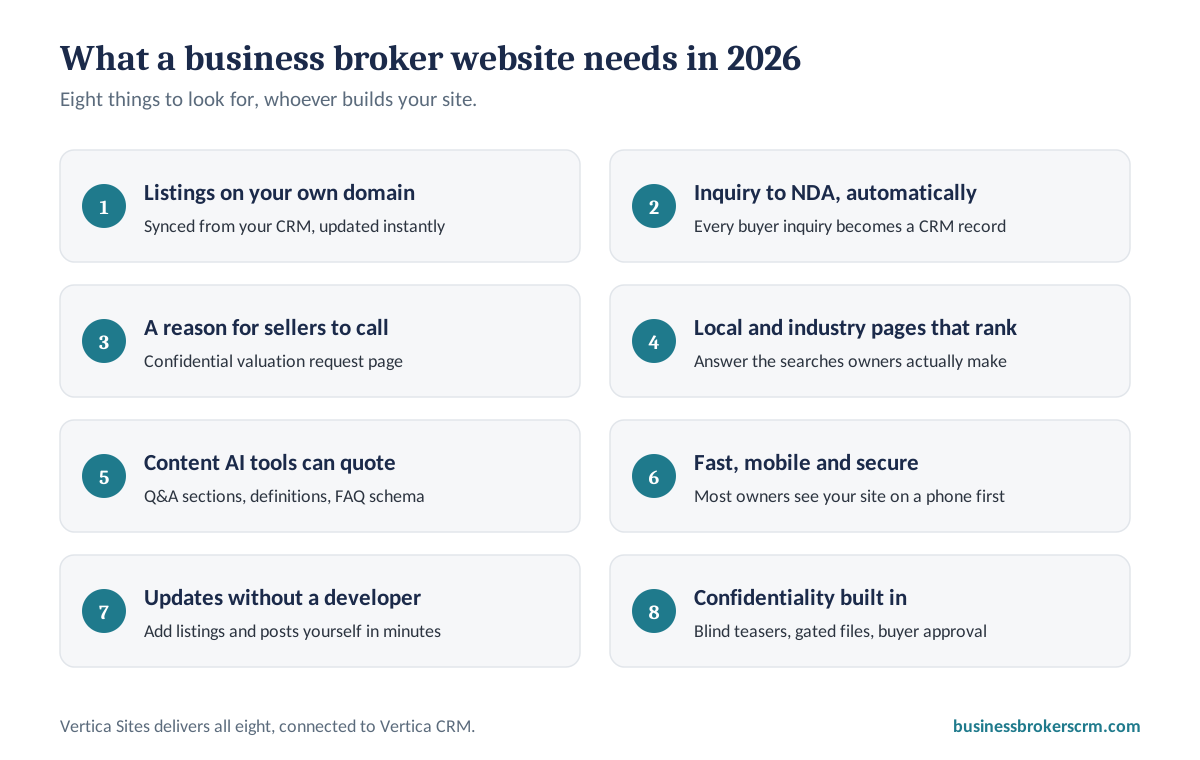
Checklist: what a business broker website needs in 2026, including listings on your own domain, buyer inquiry to NDA, seller valuation requests, local SEO, AI-ready content, mobile speed and easy updates
A business broker website checklist for 2026.

Most web designers can deliver the first look. Very few can deliver the connections: listings that sync from your CRM, inquiries that trigger NDAs, and marketing tools that work from the same data. That's the gap Vertica Sites was built to close. For more on the search side, see SEO for business brokers who mean business.

Vertica Sites and Vertica CRM: who does what

Vertica offers two products that work together. It helps to keep them separate in your mind, because they do different jobs and are priced separately.

Vertica Sites and Vertica CRM compared
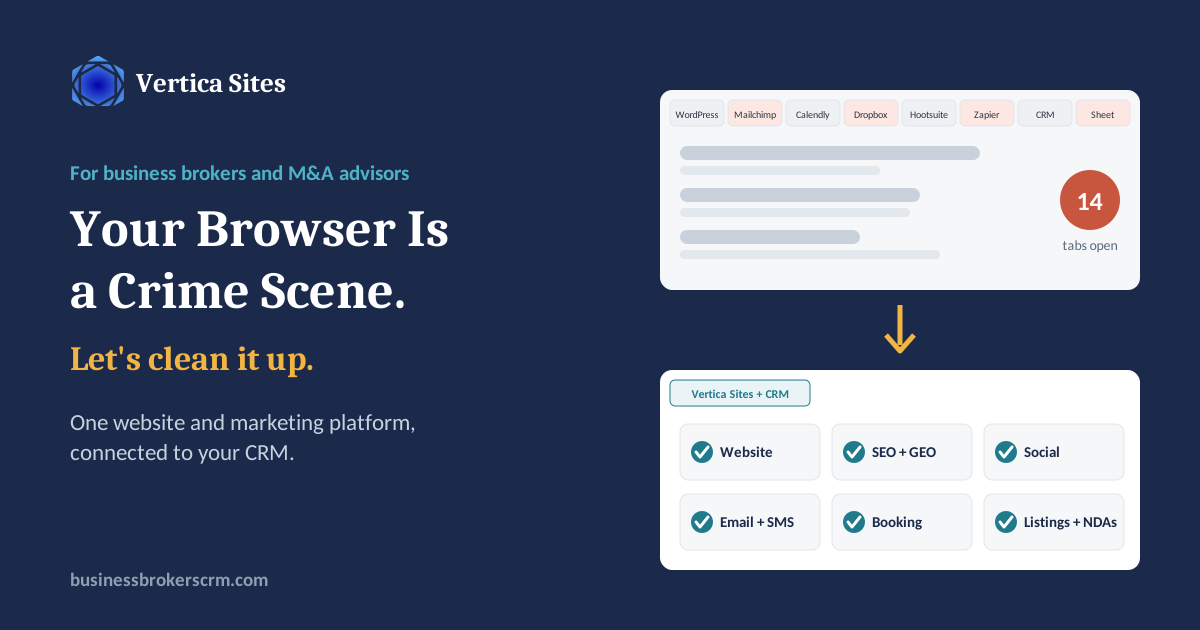
Vertica SitesVertica CRM
What it's forYour public-facing marketing: being found, building trust and capturing interestYour private deal work: managing contacts, listings and transactions
Main toolsProfessionally built website, hosting, SEO and local search, AI content and blogging, social media scheduling, email and SMS marketing, popups, live chat, appointment booking, automationContacts and companies, listings, buyer inquiries, NDAs and e-signature through Vertica Sign, buyer approval, data rooms, deals, reporting
Who sees itBusiness owners, buyers and the publicYou and your team, plus approved buyers inside their data room
Price$267.33 a month for the platform and 177 toolsPer user, on a sliding scale from $99 to $49 a seat
Vertica Sites vs. Vertica CRM: Vertica Sites runs the public website, SEO, content, social and email marketing and booking; Vertica CRM runs contacts, listings, inquiries, NDAs, data rooms and deals; listings and inquiries sync between them
How Vertica Sites and Vertica CRM divide the work, and what flows between them.

The two connect where it matters. Listings you manage in Vertica CRM appear on your Vertica Sites website and update automatically. Buyer inquiries from your site become CRM records and start your NDA process. And the people your marketing attracts end up in one database, with every email on their record. (How the contact-specific inbox works.) You can see the full list of website tools on the Vertica Sites enhanced website features page, and read about how the website service began in our original Vertica Sites introduction.

How it works: five phases from first search to closing

Here is how the combined system supports a brokerage, from the moment an owner searches for help to the day a buyer gets access to the data room.

  1. Get found on Google. SEO tools, local search targeting and AI-written articles bring business owners in your territory to your site.
  2. Get cited by AI answer engines. Q&A sections, definition boxes and FAQ schema make your content easy for ChatGPT, Perplexity and Google AI Overviews to quote.
  3. Market listings confidentially. AI drafts blind teasers and schedules them across LinkedIn, Facebook, X and Instagram for your approval.
  4. Turn visitors into conversations. Popups, live chat, forms, SMS and online booking capture buyers and sellers the moment they're interested.
  5. Close in Vertica CRM. Inquiries become CRM records, NDAs go out through Vertica Sign, and the data room releases files to approved buyers.
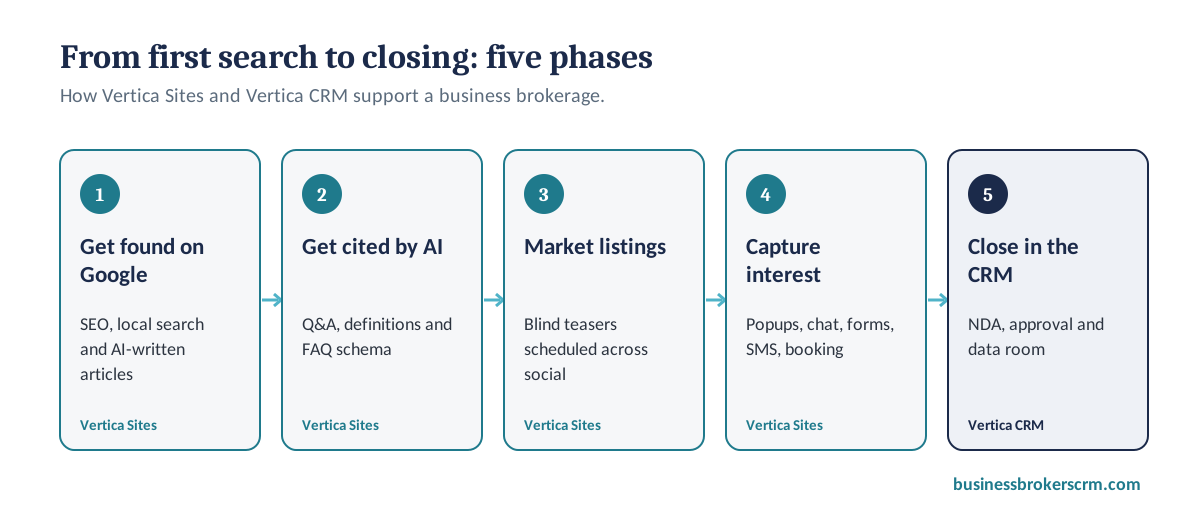
Five phases of business broker marketing with Vertica Sites: get found on Google, get cited by AI answer engines, market listings confidentially, turn visitors into conversations, and close in Vertica CRM
The five phases of business broker marketing with Vertica Sites and Vertica CRM.

Phase 1: Get found on Google by sellers in your territory

Whoever controls the inventory controls the market, and inventory starts with sellers finding you. Many broker websites are hard to find because they were built once and never optimized: thin pages, no local content, no structured data.

Vertica Sites includes a full set of search tools so your website keeps improving after launch:

  • SEO Tools Suite and SEO Intelligence. Keyword research, on-page optimization, competitor tracking and search results analysis, so you can see which terms owners in your market use and where you rank.
  • Local search targeting. Geographic targeting and localized SEO help you appear when an owner searches for a broker in your city, county or state.
  • Structured data (schema markup). Machine-readable information about your firm, your articles and your FAQs helps search engines understand and display your pages.
  • Content Gap Analysis. Finds the topics your local competitors aren't covering, so you can own them.
  • AI Blog Post Generator, AI Content Studio and AI Content Optimizer. Draft and polish articles on the questions owners actually ask, such as how to value a business for sale, then edit them in your own voice before publishing.

The goal is simple: when the owner of a manufacturing company or a medical practice in your territory searches “how do I value my business for sale,” your article is one of the answers they find. Good content does double duty, too: it's the same material you send sellers you're nurturing. (Where your next listing comes from.)

Phase 2: Get cited by ChatGPT, Perplexity and Google AI Overviews

Ranking on Google still matters, but more owners and buyers now ask AI tools directly: “What does a business broker charge?” or “Who are the best business brokers near me?” Those tools favor content that is clear, specific and easy to quote. Optimizing for them is called generative engine optimization, or GEO.

Vertica Sites' blog management gives each article two scores: an SEO score for traditional search and a GEO score for AI answer engines. With one click, its GEO content suggestions can add:

  • Q&A sections that answer the exact questions people ask AI tools.
  • Definition boxes that state key terms plainly, so an AI can quote them accurately.
  • FAQ schema that labels your questions and answers for machines.

No tool can guarantee an AI system will cite you, but structured, specific content makes it far more likely. The article you're reading uses the same approach: a quick answer at the top, tables, and an FAQ at the end. (Navigating the AI revolution: a guide for business brokers.)

Phase 3: Market listings on social media without breaking confidentiality

Once you have the listing, you need exposure across LinkedIn, Facebook, X and Instagram, without revealing who the seller is. Writing blind profiles by hand for every platform takes hours.

  • AI social post generator. Pick a source, such as an active listing, a blog post or a client testimonial, and the AI drafts platform-ready posts, including blind teasers that describe the business without naming it.
  • Scheduling and bulk scheduling. Plan posts across every connected account from one content calendar.
  • An annual marketing plan. The Marketing Manager can generate a 12-month plan with quarterly themes. Tell it how many social posts you want per day on each platform and how many blog posts per week, and it drafts and schedules content for your approval.
  • Crisis prevention monitoring. Real-time sentiment monitoring and alerts tell you when your firm or a sensitive topic is being discussed online, so you can respond quickly.

Always review AI-drafted posts before they go live. Confidentiality is your obligation, and the approval step keeps you in control. For listing-specific marketing tools inside the CRM, see Vertica CRM's listing marketing features, and for a larger pool of qualified buyers, see Vertica Leads.

Phase 4: Turn website visitors into conversations

When a buyer lands on a listing page or a seller reads your valuation article, you have seconds to start a conversation. Vertica Sites gives you several ways to do it:

  • Popup Builder. Targeted popups, for example an offer of a confidential valuation when a visitor is about to leave.
  • Live chat and an AI chatbot that answer common questions at any hour.
  • A unified communications center that brings web forms, email and SMS into one inbox. (More on text messaging for business brokers.)
  • Appointment booking with two-way sync to Google Calendar and Outlook, automated email and SMS reminders, and a team calendar, so a buyer or seller can book a call with the right broker without the back-and-forth. You won't need a separate Calendly subscription.
  • Workflow automation with a drag-and-drop builder, triggers such as form submissions, and email, SMS and task actions.

Speed matters most here: the broker who responds first usually gets the conversation. (Why follow-ups lead to fortunes.) Once a lead is in Vertica CRM, CRM automation keeps the follow-up going.

Phase 5: From inquiry to data room, inside Vertica CRM

This is where your website hands off to your CRM. When a buyer inquires on a listing, whether on your website or a marketplace such as BizBuySell, Vertica CRM takes over:

  • The NDA goes out automatically through Vertica Sign, with a full signing record saved to the buyer's contact.
  • Your approval rules apply. Approve buyers automatically when the NDA is signed, review them manually, or give provisional access. (NDA and buyer registration options.)
  • The data room releases the right files to approved buyers: the CIM, financials and supporting documents. You can see what each buyer has opened before your next call, and buyers can log in to your website to reach their files any time.

We cover this part of the process in depth in The Data Room Advantage. You can also generate the CIM itself with Vertica CRM's AI CIM generator, and marketplace inquiries can be captured automatically with lead parsing. Sellers can send documents straight into the CRM with direct seller uploads, reporting shows which marketing sources produce your buyers and listings, and Vertica's security controls protect it all.

What it costs

Vertica Sites: $267.33 a month

One flat monthly price covers your professionally built website, hosting and all 177 tools, from SEO and AI content to social media, email marketing, booking and automation. See the full list on the Vertica Sites enhanced website features page.

Tools brokers often pay for separately

Here is what the most common standalone tools cost at their entry tiers, for comparison. Each covers only one job, and none of them builds your website.

Entry-level prices of common standalone tools (per month, checked October 2026)
JobTypical toolEntry price per month
Website hostingWP Engine StartupFrom $20 (annual billing) [source]
Email marketingMailchimp StandardFrom $20 for 500 contacts; about $75 for 5,000 [source]
Appointment schedulingCalendly Standard$10 per seat (annual) or $12 (monthly) [source]
Social media schedulingHootsuite Standard$99 per user (annual billing) [source]
AutomationZapier ProfessionalFrom $19.99 (annual) or $29.99 (monthly) [source]

Prices are entry tiers published by each vendor or reported by the linked sources as of October 2026. They change often and rise with users, contacts and usage. Check each vendor's pricing page for current figures.

At entry level, those five tools alone come to roughly $170 a month for a single user, before a web designer, SEO software or AI writing tools, and before you connect them to each other.

Vertica CRM seats are separate

Vertica CRM is priced per user on a sliding scale, so the cost per seat falls as your team grows:

Vertica CRM monthly seat pricing (separate from Vertica Sites)
SeatsPrice per user per month
First user$99
Users 2 to 5$69 each
Users 6 to 10$59 each
Users 11 and up$49 each

For example, a 16-user firm pays $99 + (4 × $69) + (5 × $59) + (6 × $49) = $964 a month, an average of $60.25 per user. See how that compares with general-purpose CRMs in our CRM comparison for business brokers.

Is Vertica Sites right for your brokerage?

Vertica Sites is a strong fit if you:

  • Need a new business broker website, or your current one is outdated, slow or hard to update.
  • Pay for several separate marketing tools that don't share data.
  • Want your listings, inquiries and NDAs connected to your CRM.
  • Want to publish content regularly, but don't have time to write it all yourself.

Questions to ask any business broker website provider

Whoever you choose, ask these before you sign:

  1. Will my listings update on the website automatically when they change in my CRM?
  2. What happens to a buyer inquiry after the form is submitted? Does it trigger an NDA?
  3. Who owns the domain and the content if I leave?
  4. Which SEO tools are included after launch, not just at launch?
  5. How do you help my content appear in AI answers, not just Google?
  6. Can I add a listing, page or blog post myself without paying for changes?
  7. What does it cost per month, all in, including hosting and marketing tools?

And if you'd like help running it, Vertica People virtual assistants can handle posting, scheduling and follow-up for you.

Stop managing software. Start running your firm.

Every minute spent fixing a website template, chasing an unsigned PDF or cross-checking spreadsheets is a minute not spent with sellers and buyers. Vertica was built by people who understand business brokerage: the confidentiality, the compliance and the pace a deal needs to keep moving. (Your brokers aren't resistant to technology. Their CRM just wasn't built for them.)

Close the extra tabs. Run your website, your marketing and your deals from one connected system, and get back to what actually builds your business: relationships. (The real value of a business broker CRM isn't the technology.) (How to build a referral network that sends you listings.)

See your new website and CRM working together

I'll walk you through Vertica Sites and Vertica CRM in a 15-minute demo, using a brokerage like yours.

Schedule a Demo Questions? Call +1 212 381 4994 (USA) or +61 3 8518 4759 (Australia).

Frequently asked questions about business broker websites

What should a business broker website include?

A business broker website should show your current listings on your own domain, capture buyer inquiries and route them to an NDA, invite sellers to request a confidential valuation, publish local and industry articles that rank on Google, answer common questions in a format AI tools can quote, load fast on phones, and be easy to update without a developer.

How much does a business broker website cost?

Costs vary widely. A one-off custom design from an agency can run into thousands of dollars before hosting, SEO and marketing tools. Vertica Sites costs $267.33 a month and includes a professionally built website, hosting and 177 marketing and automation tools. Vertica CRM seats are priced separately.

What is Vertica Sites?

Vertica Sites is a website and marketing platform for business brokers and M&A advisors. It combines a professionally built website with SEO, AI content, social media, email and SMS marketing, scheduling and automation tools, and connects to Vertica CRM for listings, inquiries, NDAs and deals.

What is the difference between Vertica Sites and Vertica CRM?

Vertica Sites runs your public-facing marketing: your website, search visibility, content, social media, email campaigns and booking. Vertica CRM runs your private deal work: contacts, listings, buyer inquiries, NDAs, data rooms and deals. They are priced separately and work together.

Does Vertica Sites help my brokerage show up in ChatGPT and Google AI Overviews?

It helps your content become easier for AI answer engines to understand and quote. Vertica Sites scores each article for traditional SEO and for generative engine optimization (GEO), and can add Q&A sections, definition boxes and FAQ schema to your posts. No tool can guarantee that an AI system will cite you.

Can I market a confidential listing on social media?

Yes, with care. Vertica Sites can draft blind teasers from a listing that describe the business without identifying it, and schedule them across LinkedIn, Facebook, X and Instagram. Review every post before it goes out to protect your seller's confidentiality.

Will my listings update on the website automatically?

Yes. When a listing changes in Vertica CRM, your website updates, and listings live on your own domain rather than a third-party subdomain, so they build your site's search ranking.

Which tools can Vertica Sites replace?

Many brokerages use Vertica Sites in place of separate tools for website hosting, email marketing, appointment scheduling, social media scheduling and automation, such as WordPress hosting, Mailchimp, Calendly, Hootsuite and Zapier. E-signature, NDAs and data rooms are part of Vertica CRM.

How much do Vertica CRM seats cost?

Vertica CRM seats are separate from Vertica Sites and priced on a sliding scale: $99 a month for the first user, $69 per user for users 2 to 5, $59 per user for users 6 to 10, and $49 per user from user 11. A 16-user firm pays $964 a month, an average of $60.25 per user.