CRM for Business Brokers: Leveraging Negative Filtering for Efficient Deal Sourcing
Most CRM searches return everyone who might fit a listing. Negative filtering works the other way -- it removes the buyers who don't fit, so the list you call is shorter, more precise and ready to act on.
By Joshua Factor, Founder of Vertica CRM•Published •Updated •30 min read
Quick answer
What it is: Negative filtering in a business broker CRM is the practice of excluding records that do not match a listing or search criteria, rather than including only records that do.
How it differs from positive filtering: A positive filter on buyers interested in food service returns everyone who checked that box, regardless of budget, location or experience. A negative filter removes buyers who are over budget, in the wrong location, carry a conflict of interest, or were previously disqualified -- so the list left over is shorter and genuinely worth contacting. It works the same way for seller prospecting: instead of searching for every business in a target category, a broker starts with a broad set and excludes the ones that are a poor fit.
When to use it: Negative filtering is most useful when a new listing goes in and a broker needs to identify the right buyers from a large database quickly, when a seller has specific buyer criteria that eliminate most of the pool, and when a broker is prospecting for new sellers in a niche and needs to remove conflicts and geographic mismatches before outreach begins.
How Vertica CRM supports it: Vertica CRM supports positive filtering, negative filtering and combined filtering -- both applied at once -- with saved search templates so the same exclusion criteria can be applied every time a listing of the same type goes in.
CRM filtering approaches at a glance
Approach
What it returns
When to use it
Positive filtering
Everyone who fits the general profile
Scoping a relevant category before further criteria are applied
Negative filtering
Shorter list -- obvious non-fits already removed
You know specific disqualifying criteria and need to cut fast
Combined filtering
Most targeted -- match set with all exclusions applied
Clear buyer profile AND specific disqualifying criteria
In 12 years of working with business brokers, the most consistent reason a broker misses the right buyer is not that the buyer was not in the database, it is that the search returned too many names to work through before the listing got stale. A new listing goes in. There are 600 buyers in the database. Twenty of them are genuinely worth calling today. The challenge is getting from 600 to 20 without spending the morning manually reviewing notes.
Most CRM searches approach this by looking for buyers who match the listing criteria. The result is a list of everyone who listed food service as an interest, or who checked a box saying they wanted a business in a certain revenue range, regardless of whether they have the budget, the location flexibility or the availability to actually move on a deal right now. The broker gets 200 results instead of 600, and still has to review them before making a single call.
Negative filtering works the other way. Instead of searching for buyers who fit, it removes the buyers who clearly do not -- and the list left over is shorter, more targeted and ready to act on. This article covers what negative filtering is, when it matters for buyer matching and seller prospecting, and how to set it up in Vertica CRM. If you are still choosing a CRM for your brokerage, the criteria for evaluating platforms are covered separately.
What is negative filtering in a business broker CRM?
Negative filtering -- also called exclusionary filtering -- is a CRM search method that returns records based on what they lack rather than what they have. The distinction from positive filtering is not subtle: it produces a fundamentally different kind of list.
A positive filter on "buyers interested in food service" returns every buyer who listed food service as an interest. A negative filter on "buyers outside the price range" removes every buyer whose stated maximum purchase price falls below the listing price. Both approaches narrow the database. They narrow it in opposite directions.
In practice, three filtering modes matter for business brokers:
Filtering approaches in a business broker CRM
Approach
What it does
Typical result
Best used when
Positive filtering
Returns records that match specified criteria
Broad list -- everyone who fits the general profile
Scoping a relevant buyer category before further criteria are applied
Negative filtering
Removes records that match criteria you do not want
Shorter list -- obvious non-fits removed, ready to act on
You know specific disqualifying criteria and need to cut fast
Combined filtering
Applies both positive and negative criteria in one search
Most targeted list -- match set with mismatches excluded
You have a clear buyer profile AND specific disqualifying criteria
All three filtering modes are supported in Vertica CRM.
Positive filtering, negative filtering and combined filtering: how each approach shapes the buyer list.
The most powerful approach is combined filtering: a positive filter scopes the relevant segment, a negative filter removes the obvious mismatches within that segment, and the result is a list precise enough to hand directly to the broker making calls. That said, negative filtering alone -- applied to a list you already have -- is often the faster tool when a new listing goes in and speed matters.
Why exclusionary filtering matters especially in business brokerage
Most industries where CRMs are used involve buyers who are more or less interchangeable within a segment. Business brokerage does not. A buyer who is perfect for a $400,000 laundromat in Queens is not right for a $400,000 laundromat in Minneapolis if they have said they will not relocate. A buyer who is perfect for a food-service business is not right for this food-service business if they already own a competing one two blocks away. The need to eliminate specific individual mismatches -- not just filter by category -- is what makes negative filtering particularly valuable in this industry.
When positive filtering alone isn't enough
Positive filtering is a good starting point. It narrows a database from hundreds of contacts to a relevant segment. The problem is what stays in that segment.
A positive filter on "buyers interested in manufacturing businesses between $500K and $2M in the northeast" returns everyone who checked those boxes when they registered. It does not remove:
Buyers who checked those boxes 18 months ago and have since placed an offer with another seller
Buyers who are the right category and price range but whose geography preference is New England and this listing is in New Jersey
Buyers who represent a competitor of the seller and cannot be shown this listing without breaching the NDA they already signed
Buyers who went through due diligence on a similar listing six months ago, passed on it and have not been active since
All of those buyers remain in a pure positive search. The broker still has to identify and remove them before calling. Negative filtering does that removal in advance, so the list the broker receives is the one that is actually worth calling -- not a raw segment that still needs manual review.
The volume problem
The issue compounds at scale. A brokerage with a database of 800 buyers and a new listing in a popular segment -- food service, retail, service businesses under $1M -- might get 150-200 results from a positive filter. A broker with three active listings cannot call 150-200 buyers per listing. They call the ones they remember, the ones they last spoke to, or the ones at the top of the list. The others are missed.
Negative filtering changes the math. The same search with exclusion criteria for price mismatches, location mismatches and previously disqualified buyers might return 30-40 names. A broker can work through 30-40 names in a morning. They can prioritize, take notes and make informed decisions about which buyers deserve a longer conversation and which need to wait for a different listing.
Workflow automation can extend this further: once the filtered list is built, outreach tasks can be created and assigned automatically, so the work of calling does not stack up while the broker is handling other deals.
Buyer matching with negative filters: the six criteria that matter most
When a new listing goes in, the goal is to identify buyers already in the database who are the best fit -- and contact them before they find the listing on their own through BizBuySell or another portal. Negative filtering makes that identification faster by removing the obvious mismatches first.
Vertica CRM's lead parsing captures every buyer inquiry automatically, which means the database grows without manual data entry. Every registered buyer brings their stated criteria into the system. The negative filters work against those stated criteria plus the activity history the platform records: which listings they have been shown, which NDAs they have signed, which data rooms they have opened and whether they are currently active in a process with another seller.
Six buyer exclusion criteria that business brokers can apply to a new listing to identify the buyers most worth calling first.
How to find buyers for a business listing
The fastest way to find qualified buyers for a specific listing is not to search for everyone who fits -- it is to remove everyone who clearly does not fit, and call the remainder first. The six exclusion criteria below reduce a list of hundreds to a working set of buyers who are geographically available, financially capable and not already committed elsewhere.
Price range mismatch. Buyers whose stated maximum purchase price falls below the listing price. This is the most common exclusion. A buyer who has said they are looking for businesses under $500K should not be called on a $750K listing. They have already told you the answer.
Geographic mismatch. Buyers who have specified they will not relocate or buy outside their stated region. Location constraints are often deal-breakers that buyers have been clear about. Excluding them here saves a call that will end with "I'm sorry, that's too far from me."
Conflict of interest. Buyers who own or operate a business that competes directly with the listing in the same geographic area. Reaching out with confidential information before checking for conflicts is a risk. It is also an NDA exposure: if a buyer has signed an NDA for a competing listing and is shown this one, you have a problem the NDA and buyer registration workflow should prevent.
Previously disqualified. Buyers who were flagged during a prior process with this seller or a similar listing type. A buyer who passed on due diligence, failed NDA compliance or was removed from a prior process by the seller's request should not be reintroduced without a specific reason.
Already on an active LOI. Buyers who have signed a letter of intent with another seller and are currently in a due diligence process. They are not available to make an offer on a new listing, regardless of how well they fit. Calling them wastes a relationship and their time.
Financial capacity gap. Buyers who have not provided proof of funds or whose stated available capital falls below the listing's required down payment or full asking price. Depending on how your brokerage handles pre-qualification, this may eliminate a significant portion of the registered buyer pool -- which is the point.
Applying all six at once may reduce a list of 200 to fewer than 30. That is not a flaw in the filter. It is the filter working.
Bottom line: The buyers who remain after these six exclusions are the ones who are geographically available, financially capable and not already committed elsewhere. They are the ones worth calling the same day the listing goes in.
Negative filtering for seller prospecting
Negative filtering is equally useful when the broker is prospecting for new listings rather than matching buyers to existing ones. A list of potential sellers in a specific industry and revenue range is not hard to generate. Removing the ones you should not be contacting -- because of a conflict, a mismatch or a previous relationship -- is where the list becomes genuinely usable.
Seller prospecting exclusion criteria
Exclusion
What it removes
Why it matters
Already listed elsewhere
Businesses currently listed with another broker or brokerage
Protects relationships; contacting an actively listed business is improper in most cases
Franchise-only operators
Businesses that operate under a franchise agreement, if your brokerage represents independents only
Franchise transfers require different processes and documentation; most independent-focused brokerages pass
Outside your revenue range
Businesses whose size falls below the floor or above the ceiling your brokerage typically handles
Prevents mismatches that end in declined engagements
Buyer conflict of interest
Businesses in the same market as a buyer you currently represent under an active NDA
Showing the same opportunity to both sides of a transaction is a conflict
Geographic mismatch
Businesses in geographic areas outside your active service territory
Reduces your list to the region you can actually serve
Criteria to apply when building a prospecting list for new listings.
How this changes the prospecting conversation
A prospect list built with negative filters applied is a list you can call without qualification calls first. The obvious mismatches are already gone. The broker is not spending the first two minutes of a prospecting call discovering that the business is a franchise, or that it is already listed, or that it is too small to fit the brokerage's typical engagement size.
The same logic applies when using Vertica CRM's AI prospect list building feature: when you describe the type of seller or business you are looking for, the platform surfaces a targeted list. Applying exclusion criteria to that list before outreach begins removes the contacts that are a waste of the relationship. The ones who remain are prospects worth a real conversation about where your next listing comes from.
Combining prospecting and buyer matching
The most efficient scenario is when negative filtering works on both sides simultaneously. A broker receives a new inquiry from a buyer interested in a specific type of business. The CRM creates the buyer record, captures their criteria and immediately cross-matches the buyer database against existing listings -- while also flagging their profile against any prospecting lists the broker is actively working. If the buyer's criteria match what the broker is already trying to list, the prospecting call and the buyer conversation become two parts of the same deal. That kind of cross-matching is only possible when the CRM is maintaining clean, structured data on both sides -- which is a function of both the platform and the filtering discipline applied to it.
Beyond buyer matching: four more applications of negative filtering in a brokerage
The buyer matching and seller prospecting use cases are where negative filtering produces its most visible results. But the same logic applies in four other scenarios that come up regularly in a working brokerage -- and most brokers do not think to use the tool there.
Preventing duplicate outreach in a multi-broker firm
In a brokerage with multiple brokers, the same buyer can end up on two different call lists for the same listing if filters are applied independently. Broker A runs a search and finds a buyer who matches. Broker B runs the same search and finds the same buyer. Both call. The buyer hears from two people at the same firm about the same listing in the same week.
The fix is a filter that marks buyers as assigned once a broker has claimed them for a specific listing. A negative filter on buyers already assigned to another broker for this listing removes them from the pool when the next broker searches. In Vertica CRM, buyer assignments and listing relationships are stored at the record level, so the exclusion reflects the current state of the deal. Each broker works a distinct set of buyers for each listing -- which also ensures the same buyer relationship is not used twice on the same deal.
Re-engaging dormant buyers when the right listing appears
A buyer who registered two years ago, had two conversations and then went quiet is not necessarily gone. They may have paused their search, gone through a process on another listing that did not close, or simply not seen a listing that fit closely enough.
When a strong new listing comes in, that dormant buyer may be the right call. A combined filter finds them: positive scope on the listing criteria, negative filter on buyers contacted in the past 90 days (setting actively managed prospects aside), negative filter on buyers currently on an active LOI with another seller. What remains is a re-engagement list -- buyers who match the listing and have not been worked recently. The call is different from a cold introduction: "this just came in and I thought of you" lands differently when the buyer remembers the prior conversation. Workflow automation can schedule the follow-up sequence once the list is built, so the re-engagement runs alongside the primary outreach without adding to the broker's manual workload.
Identifying where buyers drop off inside an active deal
Negative filtering does not stop once outreach begins. It applies at any stage where the question is "who has completed this step but not yet taken the next one."
After NDAs are signed and the data room is open for a listing, a broker may have thirty buyers who have cleared the NDA and been given access. Some have opened the data room. Some have not. "Buyers who have signed the NDA for this listing but have not accessed the data room" is a negative filter result: the full NDA list, minus the buyers who have already opened the materials. That list tells the broker exactly who to call and what the call is about. The data room logs every access with a timestamp, so the filter is based on actual activity -- not assumptions or manually updated notes.
The same logic applies at every subsequent stage: buyers who received the offering memorandum but have not responded, buyers who attended a seller meeting but have not submitted an indication of interest. At each step, the "who is here but has not moved forward" question takes seconds to answer instead of a record-by-record manual review.
Cleaning the send list before a listing announcement
Before sending a listing announcement to a segment of the buyer database, negative filtering cleans the send list. Remove buyers currently in active diligence on another deal -- they are not looking at new listings right now. Remove buyers whose most recent email hard-bounced or who have asked not to be contacted by email. Remove buyers already matched to this listing through a separate outreach thread. The announcement reaches buyers who are available to receive it, not everyone who clears the positive criteria. The same filter logic that keeps a call list clean keeps a send list clean too.
How to set up negative filters in Vertica CRM
Setting up a negative filter search in Vertica CRM follows the same sequence every time. The steps below describe the process for buyer matching when a new listing goes in. The same logic applies to seller prospecting with the search running against a business database instead of a buyer database.
Define the listing parameters Before filtering the buyer database, be clear on the listing: asking price, industry, geography, size and any seller preferences about the type of buyer. The negative filters will be built from these constraints. A listing without clear parameters produces filters that are too broad or inconsistent across brokers.
Apply a positive scope filter first In Vertica CRM, start with a positive filter that scopes the relevant buyer segment: industry interest, price range and geography preference. This gives you a working set of buyers in the right category before exclusions are applied. Starting with all buyers and only excluding would take longer and produce less reliable results.
Layer in exclusion criteria Add the negative filters one by one: buyers whose stated price ceiling is below the listing price, buyers who specified they will not relocate or buy outside a specific region, buyers flagged as disqualified in a prior process, and buyers already placed on an active letter of intent with another seller. Each exclusion narrows the list toward buyers who are genuinely available and potentially interested.
Review the results before saving Check the number of results and verify the logic. A list of three may mean the exclusions are too restrictive -- relax one criterion and check again. A list of 200 means the positive scope is too broad or the exclusions are not specific enough. The goal is a list the broker can realistically contact within a few days of the listing going live.
Save the search as a template If this listing type will recur -- service businesses in a certain revenue range, or manufacturing businesses in a specific region -- save the filter combination as a template in Vertica CRM. The next listing of the same type can load the template and adjust one or two criteria rather than rebuilding the search from scratch.
Assign the list to the broker With the filtered list ready, assign it to the broker responsible for the listing. In Vertica CRM, the list can be converted into an outreach task with buyer names, contact details and listing information pre-populated. The broker starts calling the same day the listing goes in, not after a manual database review.
The time investment
The first time a broker builds a negative filter search for a listing type, it takes seconds: defining the criteria, layering the filters, reviewing the results and adjusting. With a saved template loaded, the filter is a routine that takes less time than the first call on the resulting list.
This is the practical argument for saved search templates that goes beyond efficiency. When the same exclusion criteria are applied consistently to every listing of the same type, the quality of buyer outreach becomes predictable. New brokers joining the team use the same filter logic as experienced ones. Tracking which filters produce the highest-quality matches over time allows the brokerage to refine the exclusion criteria based on what actually converts, not just what seems like a reasonable thing to exclude.
Common filtering mistakes -- and how to avoid them
Negative filtering is straightforward in principle and easy to misconfigure in practice. The most frequent mistakes are not about the logic, they are about the order of operations, the quality of the underlying data and exclusion criteria that are slightly too aggressive.
Applying exclusions before setting a positive scope
Negative filters run against the full database by default. If a broker applies "exclude buyers outside price range" before applying any positive scope filter, the exclusion runs against every record in the system. Buyers with no stated price range will not be excluded, but they may also not be right for the listing. The correct sequence: positive scope first (industry, rough price range, geography), then exclusions applied within that segment. Starting with exclusions on an un-scoped database produces unreliable counts and can miss buyers who belong in the pool.
Filtering so tightly the list comes back empty
A list of zero is the most common sign that the exclusion criteria are too restrictive in combination. Each individual exclusion may be reasonable. Together, they eliminate everyone. The fix is to relax the most specific criteria first -- usually the experience requirement or the geographic precision -- and review the count after each change. If the list is still under five names after relaxing criteria, the issue may be database coverage rather than filter logic: the buyer pool for this listing type is thin and needs to grow.
Running filters against unstructured data
Negative filtering only fires on structured fields. A price range stored in a notes field cannot be queried by a price filter. A geography preference recorded as free text cannot be matched by a location exclusion. If buyer records were entered manually or imported from a spreadsheet without field mapping, the criteria that matter most for exclusion may not be in the right place. The structured buyer record created by Vertica CRM's lead parsing system puts every criterion in a queryable field from the first inquiry -- which is why filters produce reliable results when buyer records come through the platform rather than from manual entry or spreadsheet import.
Not keeping deal stage current
A filter that excludes buyers on an active LOI only works if the LOI status is current in the CRM. If deal stages are updated manually, whenever time allows, a buyer who signed an LOI last week may still appear in a search as available. Vertica CRM updates deal stage automatically as documents are signed and milestones are recorded, so the data the filter runs against reflects the actual state of every active deal, not a snapshot from the last manual update.
Two deals that came together faster with exclusionary filters
Abstract filtering logic is easier to understand through the transactions it shapes. The two examples below are based on real deal types business brokers encounter. Names are made up.
The laundromat listing in New York City
A broker in New York City listed a laundromat at roughly $600,000. The business was unattached to a franchise, in a stable neighborhood with long-term lease terms remaining, and generating consistent cash flow. On paper, a strong listing for the right buyer.
The broker's buyer database had several hundred contacts. A positive search on "retail/service businesses" and "price range up to $750K" returned more than 150 buyers. That list was not workable in any reasonable timeframe.
Applying negative filters cut it substantially. Buyers who could not relocate to the five boroughs were removed first. Then buyers whose maximum stated price was below the asking price, even with an SBA financing component. Then buyers who had already been in a process on a similar listing in the previous six months and had passed. The filtered list came in under 25 names.
The broker worked through those names in a single day. An offer came within three days of the listing going in. An LOI was signed shortly after. The deal did not move faster because the broker worked harder. It moved faster because the right buyer was already in the database and the filter found them before the listing had time to sit.
The car wash and quick lube in the Minneapolis area
A retiring couple owned a car wash and quick lube service near Minneapolis. They had operated it for decades, had a loyal customer base and were ready to sell, but they had specific criteria for the buyer that were not typical. They did not want the business to go to a large operator who would rebrand it or change its character. They wanted an owner-operator who would run it the way they had.
The broker working the listing used exclusionary filters to build the buyer list from the start. Buyers who had indicated they were looking for businesses in major metropolitan areas were excluded, this was a smaller-market business. Buyers who had expressed interest exclusively in franchise-backed operations were excluded. Buyers who did not have some background in automotive service or small-business operations were flagged and held back pending a longer conversation.
What remained was a short list of buyers who were open to smaller markets, comfortable with independent owner-operator businesses and had relevant experience or background. The broker identified a candidate through that list: a younger buyer willing to relocate to a smaller town, with prior experience running a related service business. The buyer saw the listing as an opportunity to acquire an established operation in a market where competition was limited.
The deal closed. The sellers achieved the succession they wanted. The buyer acquired a business that fit both their budget and their operational approach. The data room maintained a full log of every buyer who had been shown the listing and every document they accessed -- useful both for the transaction process and as protection against any later questions about who had been contacted and when.
Negative filtering in Vertica CRM: what the platform provides
Negative filtering is only as good as the data it runs against. A filter that excludes buyers outside a price range works when buyers have provided their price range and it is stored in a structured field the CRM can query. A filter that excludes buyers already on an active LOI works when the CRM is tracking deal stage and the LOI status is current. Vertica CRM is built to keep that data current as a function of normal use, not as a separate data entry task.
What buyer data your CRM needs for filtering to work
Negative filtering fires on structured fields. For the six buyer exclusion criteria to work reliably, every buyer record needs four things stored as queryable data -- not in a notes field: a stated price range (floor and ceiling), a geography preference (at minimum, whether the buyer will relocate and to which regions), a current deal stage (available, in process, on LOI, closed), and a last-contact date. Without these four fields populated, a price exclusion misses buyers with no stated range, a location exclusion passes buyers with free-text geography notes, and a LOI exclusion cannot distinguish an active buyer from one who went quiet. The structured buyer record created through Vertica CRM's lead parsing system puts each of these in a queryable field from the first inquiry -- which is why filters produce reliable results when buyer records come through the platform rather than from manual entry or import.
Structured buyer data from day one
Every buyer who inquires through Vertica CRM's lead parsing system has a structured record created at the moment of inquiry: price range, industry interest, geography preference, contact history and deal stage. That record updates automatically as the buyer moves through the process -- NDA signed, data room accessed, LOI status changed. The data the negative filter runs against is the same data the broker is working from in every conversation. There is no separate data hygiene step required to make filtering reliable.
Combined filtering and saved templates
Vertica CRM supports positive, negative and combined filtering, with the ability to save any search combination as a reusable template. A brokerage that lists service businesses regularly can build a template that includes the appropriate positive scope filters and the standard exclusion criteria, then apply it to every new service listing with one click and minimal adjustment. Over time, those templates accumulate into a filtering library that reflects the brokerage's actual experience of which buyer criteria matter and which are noise. In a multi-broker firm, shared templates also ensure that each broker applies the same exclusion logic -- so the buyer pool for a listing is not filtered differently depending on who runs the search.
Automatic buyer matching on new listings
With negative filtering, the broker sees a set of potential matches immediately, reviews them against the listing's specific criteria and applies additional exclusion filters to sharpen the list. The deliberate negative filtering produces results that an alternative filter wont produce.
The audit trail that runs behind every match
Every buyer contact generated by a filter search, every outreach task created from that contact list, every conversation that follows, all of it is logged to the buyer record in Vertica CRM automatically. When a deal closes and someone asks who introduced the buyer to the seller, the answer is in the platform: the date the buyer was matched to the listing, the broker who made the contact, the documents the buyer accessed and the dates of every subsequent interaction. The full comparison of CRM platforms for business brokers covers this audit function alongside the other features that distinguish purpose-built platforms from general CRMs.
To see how negative filtering and buyer matching work in Vertica CRM on a listing you are currently working, the demo is the fastest path to a real answer.
Terms you may hear when filtering a buyer database
Negative filtering
A CRM search method that returns records based on what they lack rather than what they have. Also called exclusionary filtering. The opposite of positive filtering.
Positive filtering
A CRM search method that returns records that match a specified criterion. Returns everyone who fits; used to scope a relevant buyer category before exclusions are applied.
Combined filtering
A search that applies both positive and negative filters in the same query. Includes records that match the target criteria and excludes records that fail the exclusion criteria, producing more targeted results than either filter alone.
Boolean search
A search that uses logical operators such as AND, OR and NOT to combine multiple criteria. Negative filtering is typically implemented as a NOT condition in a Boolean search.
Saved search template
A stored set of filter criteria that can be reloaded and applied to a new search without rebuilding it from scratch. Useful when the same type of listing recurs.
Conflict of interest
In deal sourcing, a situation where a buyer owns or operates a competing business in the same geographic area as a listing, or where the broker already represents a buyer whose interests conflict with those of a prospective seller.
See negative filtering on a listing you are working right now
Bring a real listing and a real buyer database. We will run the filters live and show you what the list looks like on the other side.
Schedule a DemoQuestions? Call +1 212 381 4994 (USA) or +61 3 8518 4759 (Australia).
Frequently asked questions
What is negative filtering in a business broker CRM?
Negative filtering -- also called exclusionary filtering -- is a CRM search method that returns records based on what they lack rather than what they have. Instead of searching for buyers who match a listing, a negative filter removes buyers who clearly do not fit, leaving a shorter list of buyers worth contacting. Vertica CRM supports negative filtering alongside positive and combined filtering.
How is negative filtering different from positive filtering?
Positive filtering includes records that match a specified criterion. Negative filtering excludes records that match a criterion you do not want. A positive filter on food-service buyers returns everyone who listed food service as an interest. A negative filter on buyers outside a price range removes everyone whose stated budget does not meet the listing price. Both can be combined: positive to scope the relevant category, negative to remove the obvious mismatches within that category.
When should I use negative filtering instead of a positive search?
Use negative filtering when your positive search returns a list that is too long to work through efficiently, when a seller has specific buyer requirements that eliminate most of the database, or when you know in advance that certain buyer profiles are not a fit for the listing. Negative filtering is also useful for seller prospecting: removing franchise-only operators, geographic mismatches or businesses already listed elsewhere gives you a prospect list you can actually use.
What buyer criteria are most useful to exclude when a new listing goes in?
The six most useful buyer exclusion criteria are: buyers whose stated price ceiling is below the listing price; buyers who will not relocate or buy outside their stated region; buyers with a conflict of interest such as a competing business in the same market; buyers who were disqualified in a previous process with this seller or a similar listing; buyers already placed on an active letter of intent with another seller; and buyers who have not provided proof of funds and whose stated capital falls below the listing minimum.
Can I use negative filtering for seller prospecting as well as buyer matching?
Yes. When prospecting for new listings, negative filtering removes the businesses you should not contact: businesses already listed with another broker, franchise operations if your brokerage only represents independents, businesses outside your active revenue range, businesses where you already represent a buyer with a conflict of interest, and geographic areas outside your service territory. The result is a prospect list that is ready to use rather than one that needs manual review.
Does Vertica CRM support negative filtering?
Yes. Vertica CRM supports positive, negative and combined filtering across the buyer and business databases. Filters can be stacked, saved as templates and applied to new listings. When a listing goes in, the platform can automatically cross-reference the buyer database and surface likely matches -- a process that saved filter templates make faster and more precise.
Can I save my negative filter searches as templates in Vertica CRM?
Yes. If you handle a recurring listing type -- service businesses in a specific revenue range, or manufacturing businesses in a certain region -- you can save the filter combination as a template in Vertica CRM. The next listing of the same type loads the template and requires only minor adjustments rather than rebuilding the search from scratch each time.
How does combined filtering differ from negative filtering alone?
Combined filtering layers a positive scope filter and a negative exclusion filter in the same search. It first includes records that match the criteria you want -- industry, price range, geography -- and then excludes the records that fail the criteria you do not want: disqualified buyers, price ceiling mismatches, conflicts of interest. The result is more targeted than either filter applied alone and is the most precise approach when a listing has both a specific buyer profile and a set of clear disqualifying criteria.
What happens if a negative filter search returns zero results?
A result of zero typically means the exclusion criteria are too restrictive in combination. Relax one criterion -- usually the most specific geographic or experience exclusion -- and run the search again. A zero result can also mean the buyer database does not yet have records that match the positive scope, which is a signal to look at how new buyer inquiries are being captured and categorized in the CRM.
How does negative filtering help prevent commission disputes?
By creating a documented, filtered list of buyers contacted for each listing -- with criteria and timestamps recorded in Vertica CRM -- the broker has a clear record of which buyers were matched to which listing and when. This adds to the audit trail Vertica CRM maintains on every interaction: every email, every NDA signed, every document opened in the data room. If the source of a buyer introduction is ever questioned, the matching record and the interaction log together make the case.
Can negative filtering prevent two brokers at the same firm from calling the same buyer?
Yes. In Vertica CRM, buyer assignments and listing relationships are stored at the record level. A negative filter on buyers already assigned to another broker for a specific listing removes them from the results when a second broker runs the same search. This prevents duplicate outreach -- two brokers calling the same buyer about the same listing in the same week -- and ensures each broker works a distinct set of contacts for every deal.
Can I use negative filtering to identify buyers who signed an NDA but have not accessed the data room?
Yes. Any condition stored in Vertica CRM can serve as a filter criterion, including deal-stage activity. A filter that returns buyers who have signed the NDA for a listing, minus the ones who have already opened the data room, produces exactly that list. The same logic applies at every stage that follows: buyers who attended a seller call but have not submitted an indication of interest, buyers who received an offering memorandum but have not responded. The data room logs every access with a timestamp, so the filter is based on actual activity data, not manual notes.
Founder of Vertica CRM and a former business broker. Vertica CRM has spent 12 years building software exclusively for business brokers and M&A advisors, shaped by feedback from hundreds of brokerage clients. Connect on LinkedIn.
As a business broker, your success hinges on your ability to efficiently source and match potential buyers and sellers. A robust CRM system is essential for managing your pipeline, tracking interactions, and ultimately closing deals. One powerful feature that can significantly streamline your workflow is negative filtering.
What is Negative Filtering?
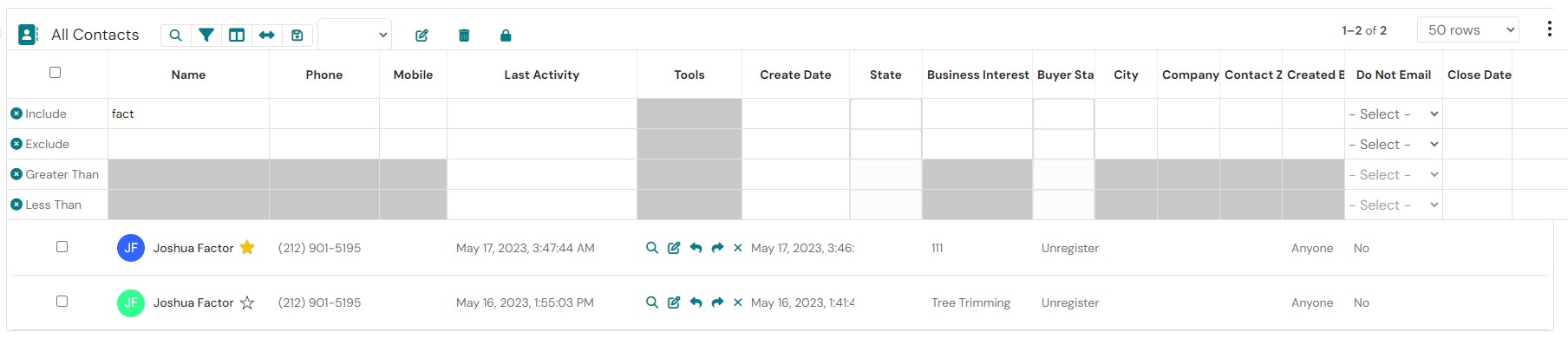
Negative filtering, also known as exclusionary filtering, allows you to search for data based on the absence of specific criteria. In the context of a CRM for business brokers, this means you can find potential deals that do not meet certain parameters.
Key Use Cases for Negative Filtering in Business Brokerage
For Buyers:
Identifying Businesses Within a Specific Budget: Exclude businesses that exceed your client’s budget.
Finding Businesses in Desired Locations: Exclude businesses in areas that your client is not interested in.
Targeting Businesses with Specific Growth Potential: Exclude businesses that are stagnant or declining.
Avoiding Businesses with Known Issues: Exclude businesses with legal, financial, or operational problems.
Avoiding Potential Conflicts of Interest: Exclude buyers who may have conflicts of interest with your client or their business.
For Sellers:
Finding Buyers Who Meet Specific Criteria: Exclude buyers who don’t meet your client’s requirements (e.g., industry experience, financial capacity).
Avoiding Potential Conflicts of Interest: Exclude buyers who may have conflicts of interest with your client or their business.
Targeting Buyers in Specific Geographic Locations: Exclude buyers who are not interested in businesses in your client’s location.
Identifying Buyers with Specific Investment Goals: Exclude buyers who are not aligned with your client’s goals (e.g., growth, passive income).
Identifying Unrepresented Businesses: Discover businesses that are not currently represented by other brokers. This can provide you with a unique opportunity to secure a listing.
Targeting Niche Markets: Focus on specific industries or business types that align with your expertise. By excluding businesses outside your target market, you can streamline your search and increase your chances of success.
Customizing Your Search: Tailor your search criteria to match your specific needs and preferences. For example, you might exclude businesses that are too small, too large, or located in a particular region.
How to Implement Negative Filtering in Your CRM
Most modern CRMs offer advanced search capabilities that include negative filtering options. Look for features that allow you to:
Exclude specific keywords: Search for businesses that do not contain certain terms in their name, description, or industry.
Filter by location: Exclude businesses in specific regions or countries.
Use numerical ranges: Exclude businesses based on their revenue, number of employees, or other quantitative metrics.
Combine criteria: Use Boolean operators (AND, OR, NOT) to create complex search queries that exclude multiple criteria.
Start with broad criteria: Begin with a wider net to capture more potential leads. You can then refine your search using negative filtering to exclude irrelevant options.
Combine positive and negative criteria: Use a combination of positive and negative filters to create highly targeted searches. For example, you might search for businesses in a specific industry that are not currently represented by other brokers.
Experiment with different filters: Try different combinations of filters to see what works best for your specific needs.
Custom fields: Create custom fields to store additional information about businesses or buyers and use them in your negative filtering searches.
Save your search criteria: Save frequently used search criteria as templates to quickly reuse them in the future.
Comparison with Other Methods:
While exclusion filtering offers a unique and powerful way to narrow down search results by excluding irrelevant data, it’s important to understand how it compares to other filtering methods and CRM features to fully appreciate its value.
Positive Filtering:
Positive filtering, also known as inclusionary filtering, is the more traditional approach used in CRMs. It focuses on selecting records that meet specific criteria rather than excluding those that don’t. For example, if a broker is searching for businesses in a specific industry, positive filtering would allow them to include only those businesses in the chosen industry. This method is straightforward and effective when the desired criteria are well-defined and the goal is to compile a list that matches specific requirements.
However, positive filtering can sometimes result in overly broad search results, especially when multiple criteria are applied. It may also include data that, while technically fitting the criteria, is not relevant to the broker’s specific needs. This is where negative filtering becomes particularly valuable, as it allows for more precise control over search results by removing unwanted data.
Combined Filtering:
The most powerful searches often use a combination of both positive and negative filtering. By layering positive filters (to include desired attributes) with negative filters (to exclude undesired ones), brokers can create highly targeted searches. For instance, a broker might use positive filtering to select businesses within a certain revenue range and industry, and then apply negative filtering to exclude those located in regions their client isn’t interested in. This combination approach maximizes the efficiency of the search process, ensuring that only the most relevant results are returned.
In addition to using negative filtering to find suitable businesses for sellers, you can also use it to identify potential buyers who meet specific criteria. For example, you might exclude buyers who are only interested in large-scale businesses or those who do not have the financial resources to complete a transaction.
By using negative filtering effectively, you can streamline your deal sourcing process, identify high-quality leads, and ultimately close more deals.
“At Vertica CRM, we understand that your most valuable asset as a business broker is your time. You don’t want to waste precious hours battling with complex software or technology. You need information quickly and easily to close deals. Our mission is to provide you with the tools you need to get deals done efficiently and effortlessly.
Unlike other CRM systems that can be clunky or difficult to navigate, Vertica CRM is designed with a user-friendly interface that requires minimal training. You’ll be able to find the information you need and complete tasks quickly and efficiently, without spending hours learning complex features.” This tool in particular is very easy to navigate.
I remember a time when I was still brokering businesses and a colleague had just listed a profitable laundromat in New York City for around $600,000. As soon as I saw the new listing, I conducted a negative search to identify potential buyers who had expressed interest in similar businesses or locations. Using the results, I created a specialized marketing list from my database. Within three days, I had received an offer and signed a Letter of Intent (LOI) for the laundromat. This demonstrates the power of negative filtering in quickly matching buyers with suitable businesses. My cut of that commission was more the $25,000 and I earned it with with just a few phone calls.
Additional Vertica CRM Features for Business Brokers
Deal pipeline management: Visualize your deals at different stages of the sales process.
Document management: Store and organize important documents related to each deal.
Email & SMS integration: Send and track SMS & emails directly from within the CRM.
Task management: Assign tasks to yourself or team members to ensure follow-up and deadlines are met.
Reporting and analytics: Generate reports to track your performance and identify areas for improvement.
Case Study: A Successful Deal Closed with Negative Filtering
A business broker, Joe from a business brokerage company near Minneapolis, specialized in representing small to medium-sized businesses in the auto related industry. He recently had a client, a retired couple looking to sell their successful car wash and quick lube. Joe knew that finding a suitable buyer would require a targeted search.
The car wash and quick lube was located in a small town with limited local buyer interest. Joe needed to find a buyer who was willing to invest in a specialized business and had experience in the industry.
Using the exclusionary filtering feature in his CRM, Joe was able to create a highly targeted search. He excluded businesses located in major cities, as well as buyers who were only interested in franchises or large-scale operations. He also filtered out buyers who did not have experience in the auto related service industry.
Joe’s search led him to a potential buyer, a young entrepreneur with a passion for this specific niche who was looking to relocate to a smaller town. The buyer was impressed by the business’s reputation and the opportunity to own a well-established business.
Negative filtering played a crucial role in this deal by helping Joe identify a buyer who perfectly matched his client’s needs. By excluding irrelevant buyers, Joe was able to focus his attention on the most promising leads, ultimately leading to a successful transaction.
By effectively leveraging negative filtering and the other powerful features offered by Vertica CRM, you can save time, improve your efficiency, streamline your deal sourcing process, identify high-quality opportunities that might otherwise be overlooked, and achieve greater success in your business brokerage practice.
Contact us now to schedule your personal demo at www.BusinessBrokersCRM.com or visit www.VerticaCRM.com directly and see how Vertica CRM can transform your business brokerage practice. You can call us at +1 212 381 4994 in the USA or +61 385 184 759 in Australia.